
Stop digging. Find any project photo fast.
PictaBase is the lightweight Digital Asset Manager for field teams, inspectors, and agencies — organize by concept inside shared projects and find what you need fast. Pay once; your files and metadata stay yours.
30-day money-back guarantee — if it doesn’t fit your workflow, email support for a full refund.
The Demo
From folder graveyard to found in 2 seconds.
Stop digging through folders and start finding by concept, using tagging and simple, intuitive, chip-based search.

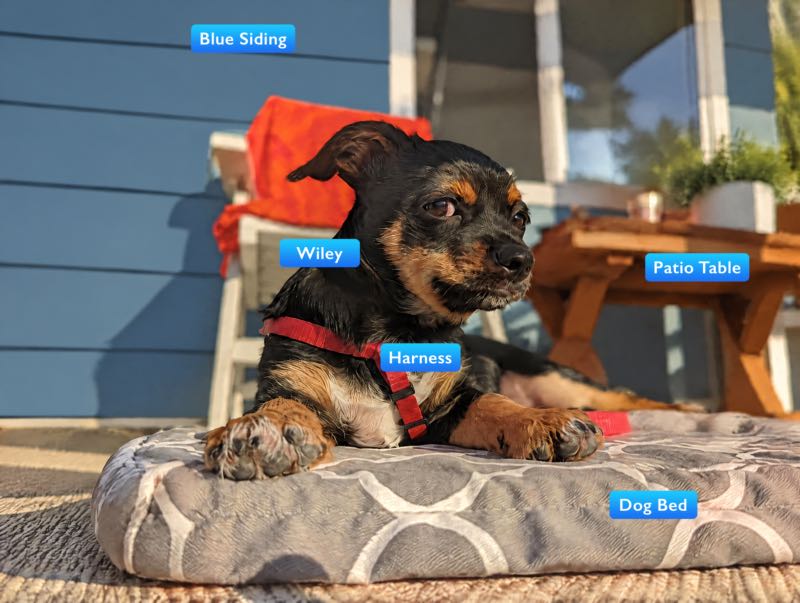
Drag the handle to reveal the tags
Why PictaBase is different
- Your photos never touch our servers. Direct browser-to-S3 uploads — image bytes never transit PictaBase servers.
- Projects, not just tags. Tags alone become their own graveyard. A project — “Maple St. inspection,” “Spring auction,” “Q3 listings” — scopes the search before anyone tags a thing, and shared projects keep the whole team inside the same fence.
- Your tags travel with your files. Every tag, note, and AI label is written to a portable .meta.json file alongside each image — readable by any tool, forever, even without PictaBase.
- One-time payment, not a forever subscription. Pay once per code. No annual rental, no per-seat creep, no lock-in.
Digital Asset Management, Right-Sized
Not an enterprise DAM — a right-sized one. Project-scoped libraries, relational tagging, and team sharing for agencies, field crews, and solo professionals whose photos are working records, not decoration. No $15,000 rental. No six-week onboarding.
| Dimension | Typical DAM Solutions | PictaBase |
|---|---|---|
| License model | $15,000+ annual rental | One-time payment. Generous lifetime storage included. |
| Data handling | Vendor lock-in and data trapping. | Your files. Your metadata. Export anytime. |
| Setup | Weeks of setup and training. | Minutes to first project. |
| Data privacy | All assets route through vendor servers. | Direct browser-to-S3 uploads. |
| Philosophy | Gatekeepers and governance. | Built for the person doing the work, not the person approving it. |
| Taxonomies | One-size-fits-all. | Industry-specific templates. |
Full comparisons
Inside a real PictaBase project
A working library, not an empty demo.
This is a real founder workspace from PIFster, our nonprofit project — not a customer testimonial. Projects give the library context; categories and tags make the individual assets findable.
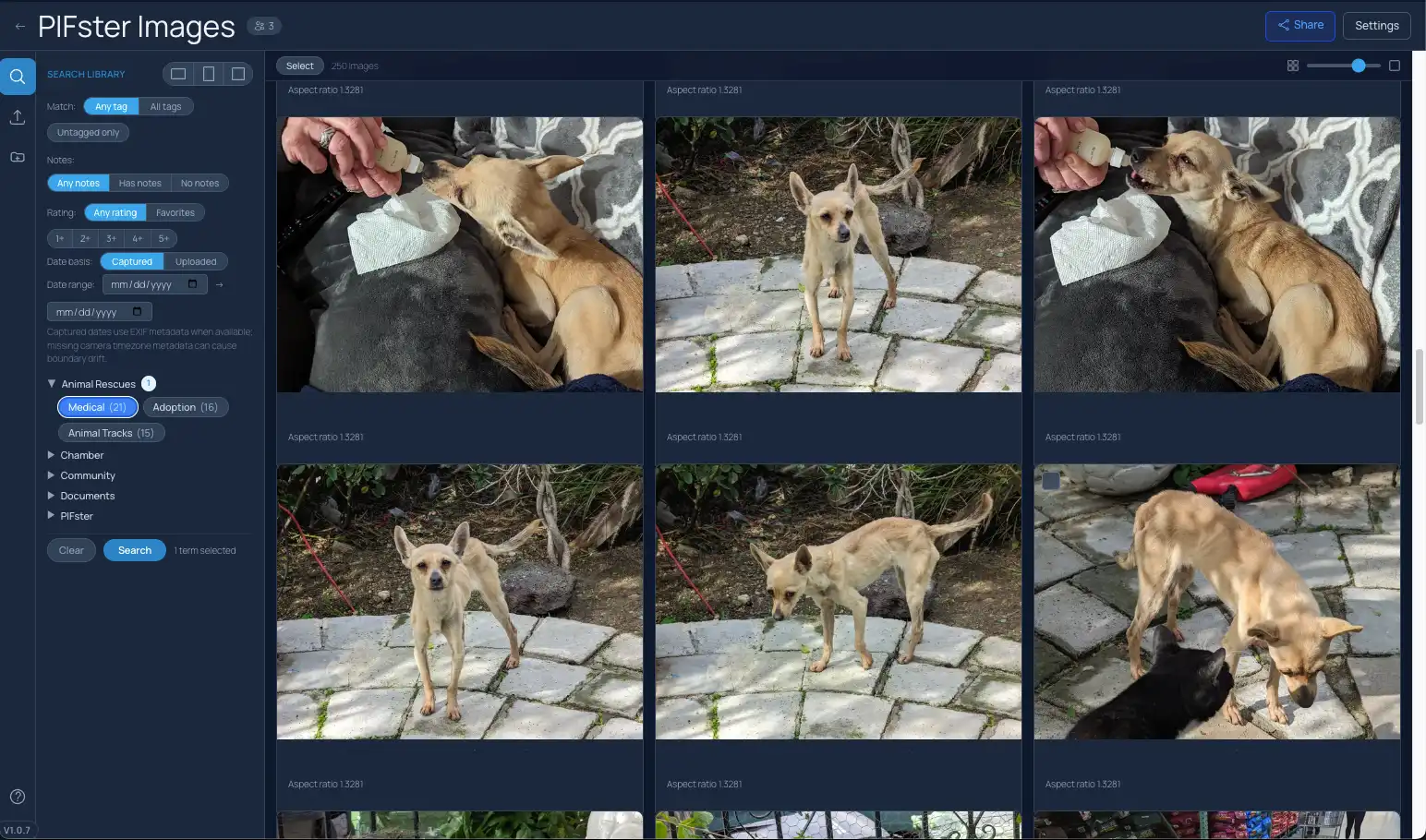
- Search within the project instead of searching one giant library.
- Categories keep the vocabulary organized before terms become clutter.
- Teams share the same working context across uploads, filters, and review.
Meet the Founder
Built by someone who lived the problem
Chris Conlee spent 30 years in professional film and television post-production — where managing visual assets is the job, not the chore. PictaBase is the tool he wished existed.
Launch Instantly with Your Industry’s Standard Language
True field digital asset management means speaking the language of the job site, not the marketing department. Launch instantly with 15+ industry-standard templates — each fully customizable.
- Filmmakers: Scene, Character, Int/Ext, Shoot Day Explore Film Production
- Insurance Adjusters: Policy Type, Loss Type, Severity, Status Explore Insurance Claims
- Construction Teams: Phase, Trade, Issue, Floor Area, Status
- Legal Researchers: Evidence Type, Admissibility, Source, Status
- Curators: Provenance, Era, Appraisal, Loan Status
- Wedding Photographers: Subject, Timeline, Style, Delivery
- Warehouse Managers: Stock, Aisle, Condition, Safety
- E-Commerce: SKU, Color, Size, Season
- Art Collectors: Medium, Genre, Location, Documents
- Animal Rescues: Species, Intake Type, Temperament, Status
- Lifestyle / Personal: People, Pets, Documents, Travel, Events
- You Name It: If your industry isn’t represented, build your own template and share it with the community.














Why Field Teams Choose PictaBase
Construction photo management. Stop losing site inspection photos in group chats. Superintendents and project managers get a searchable visual timeline of every job site.
Insurance adjustment and claims. Document losses faster — AI suggests tags like “Water Damage,” “Roofing,” and “Drywall,” creating an organized evidence locker for every claim.
Location scouting and film. Build a location library that actually works. Filter by “lighting,” “access,” or “period” to find the perfect shot in seconds.
AI Tagging
AI That Takes Suggestions, Not Control
Most AI taggers clutter your library with expensive junk. Ours acts as your assistant: select an image, request a scan, and adopt only the tags that fit. High-confidence suggestions. Take ’em or leave ’em. Manual tagging is always there when you want it. No unpredictable per-image AI fees — it’s included.
Hover or tap the dots — those are real tags our AI detected on this photo.
Performance
Built for Real-World Asset Retrieval
Filter visual assets by tags, notes, ratings, favorites, and date ranges from a single panel. Browse a large project library without the lag, slowdown, or memory crashes that turn finding one photo into another job.
Collaboration
Feedback in Context
Don’t send screenshots of screenshots. Leave precise notes right on the asset. Whether it’s a boom mic in the shot or a crack in the drywall, your team sees it in context.
Delivery
Deliver Like a Pro
Turn a folder of raw images into a branded, password-protected client gallery in seconds. Set expiry dates, toggle download permissions, and send it off.
Privacy
Your Data. Securely Stored.
Your photos upload straight from your browser to our S3 storage. PictaBase never handles your image bytes; it keeps the project context and metadata that make them findable.
Scale
The Graveyard vs. The Library
A hard drive is a graveyard where photos go to die. Most teams outgrow their folder system within months. PictaBase scales to hundreds of thousands of assets with instant search, custom taxonomies, and a virtualized gallery that stays responsive.
Lifetime Deal
No ‘Call Sales’ Buttons Here — and the Deal is Built to Last
Enterprise DAMs charge $3,000–$15,000/year and hide it behind a demo request. PictaBase starts at $49. Once. Forever. AI tagging and team seats included.
Sounds exciting, right? But we’ve all felt the sting of a too-good-to-be-true deal suddenly biting the dust and leaving us stranded.
Photographers on forums put the subscription objection bluntly:
“Once you’ve started paying for storage, you must pay forever — and should you choose to change products, you’ve then the problem of moving potentially terabytes of data.”
— Rich_A, The Photography Forum
We did the math before we set the price
Most Lifetime Deals die because the company promises unlimited everything and then drowns in server bills. We modeled every tier against real AWS costs.
Lifetime means we keep earning it. Your storage is paid years ahead; beyond that, early buyers are carried by continued sales and optional top-ups — the honest version of how every lasting lifetime deal works.
Fair limits, not fake limits. Our storage allocation covers your real infrastructure cost for years — not months. A Solo buyer’s $49 covers ~4.6 years of actual AWS bills at typical usage — hosting math only; support and ongoing development are funded by storage top-ups and continued sales.
Fair-priced growth, not a trap. If you outgrow your base storage, top-ups start at $2.99/month — priced to cover our AWS bill with a sustainable margin, not to extract maximum revenue.
Your metadata travels with your files. Every asset gets a sidecar .json file written to S3 alongside it — containing all your tags, categories, and EXIF data in plain, open format. Readable by any tool, forever.
Do I really need this?
If your team wastes hours digging through scattered Dropbox folders, messy Google Drives, and unlabeled site photos just to find last week’s inspection photos — yes. If your current system works and nobody complains, save your money.
The Deal
Each code adds storage, seats, and projects — stack up to 4. Optional storage top-ups from $2.99/mo if you outgrow your plan.
Secure checkout processed by Stripe.
Frequently Asked Questions
How are projects different from tags?
Tags describe what’s in a photo; a project describes why you’re looking. You open “the Riverside build inspection” and search inside a few hundred relevant assets instead of a hundred-thousand-file library — findable before anyone tags anything. When you do tag, typeahead suggests the terms your team already uses — and categories keep that vocabulary organized (“Loss Type” holds “Water Damage,” “Phase” holds “Rough-in”), so a tag always carries its context instead of floating loose. Even the free tier includes two seats — one owner and one shared teammate seat — so a teammate can experience the workflow with you.
Is there a free plan?
Yes — every feature enabled, no credit card required. 250 MB, one project, two seats.
What if I outgrow my storage?
Top-ups start at $2.99/month — priced to cover our AWS bill with a sustainable margin, not to extract maximum revenue.
Can I export my data?
Always. Every asset gets a sidecar .json file with all your tags, categories, and EXIF data in plain, open format — readable by any tool, forever.
Is my data secure without SOC 2?
PictaBase does not currently claim SOC 2 certification. Your photos upload directly from your browser to our S3 storage, so image bytes do not transit PictaBase servers. We handle project metadata and access controls, and portable sidecars help prevent lock-in. Organizations with formal certification requirements should evaluate whether PictaBase meets their policies.
Is there a money-back guarantee?
Yes — 30 days, no questions asked.