
Film Production Photo Management
Continuity was the first PictaBase use case. The project model grew from there.
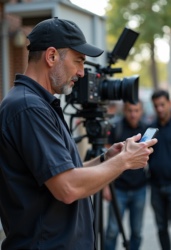
On a production, photos are not decoration. Continuity references, location scouts, props, makeup tests, wardrobe, greens, and set documentation are working records that move between departments and follow the project from prep through post.
PictaBase gives a crew a searchable visual workspace without forcing every department into one giant, cluttered tag pool.
One production can contain many working projects.
A project can represent the whole production, an episode, a unit, or a department’s specific need. You might create projects for:
- Locations — scout photos searchable by access, lighting, period, geography, and production notes.
- Props and greens — reference images, continuity states, and set-specific details in their own working context.
- Makeup and wardrobe — character looks, SFX references, aging, bruising, and continuity checks.
- Editorial and publicity — retrieve the exact scene, character, or shoot-day reference without searching the entire production archive.
Start with the film template. Make it yours.
The Film Production template starts with categories for Character, Scene, Day / Night, Int / Ext, Shoot Day, Location, Props, Wardrobe, and Makeup. Terms such as Day, Night, Int, Ext, Bruise, Beauty, SFX, Aging, and Clean are ready where they help. Add the vocabulary your production actually uses — including department-specific categories like Greens or Unit.
Projects provide the first layer of organization. Categories keep the vocabulary in context. Tags describe the individual asset. When someone adds a term, typeahead suggests the shared vocabulary that came before, reducing the slow drift toward near-duplicate tags.
From set to searchable reference
A crew member can capture or upload a reference at the job site, choose the relevant project, and find it later by the language of the production. The responsive web app keeps the workflow available beyond one editor’s desktop or one person’s folder structure.
This is not a replacement for your NLE, dailies system, or production-management platform. It is the visual working layer around them: a place to make the images your crew relies on findable.
Frequently asked questions
- Who is the film workflow for? Editors, script supervisors, location teams, props, makeup, wardrobe, greens, unit publicists, and crews who need shared visual references.
- Can I customize the film categories? Yes. The starter template is a beginning, not a fixed schema.
- Can a small crew try it? Yes. The free tier lets a team experience the project and sharing workflow before buying.
Start free — no credit card required. Or see the full PictaBase workflow.